
 English
 Français
 日本語
 العربية
 繁体中文
 简体中文


Does Your CarPlay Interface Really Fit the Vehicle? Display and Interaction Need More Than Basic Compatibility.
1. CarPlay Compatibility Is Only the Starting Point
For automotive manufacturers and infotainment system developers, supporting Apple CarPlay is an important part of delivering a connected vehicle experience.
However, establishing a successful connection between an iPhone and a vehicle does not automatically guarantee a consistent user experience.
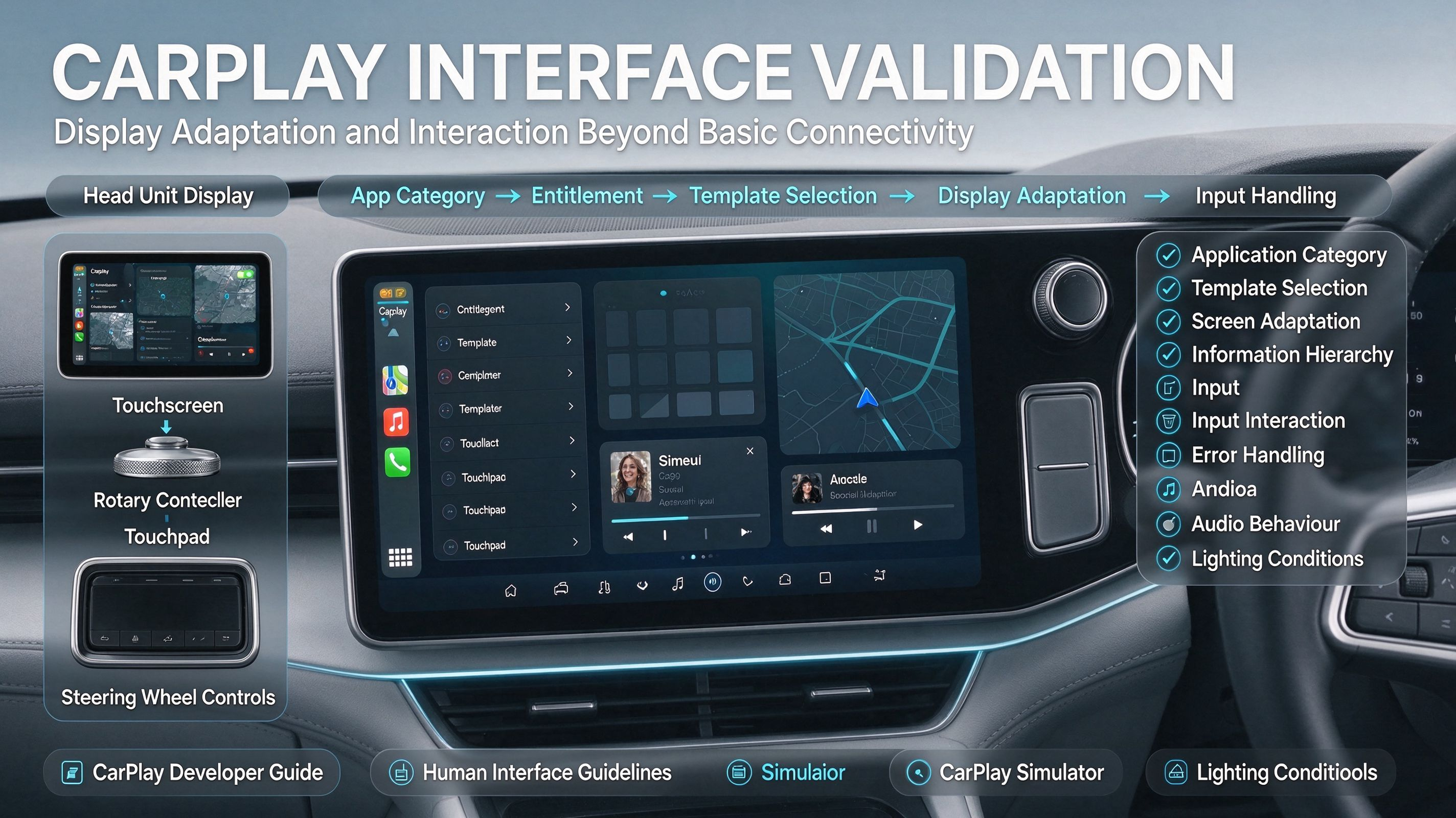
Different vehicles may have different display sizes, screen configurations and input methods.
A system may use a touchscreen, rotary controller, touchpad or a combination of these interfaces.
This creates an important question for development teams:
How can a CarPlay implementation provide a consistent and usable experience across different vehicle configurations?
The answer begins with understanding Apple's CarPlay architecture and its approach to interface presentation.
2. Understanding Apple's Template-Based Architecture
Apple provides the CarPlay framework for applications that support relevant in-vehicle experiences.
Instead of allowing developers to create every aspect of the vehicle interface independently, CarPlay uses system-provided templates.
The application provides the relevant content, while the CarPlay framework manages important parts of the interface presentation.
This approach helps maintain a consistent user experience across supported vehicle environments.
Apple's documentation describes different templates for different application categories.
These may include:
List templates.
Grid templates.
Tab bar templates.
Alert templates.
Map templates.
Now Playing templates.
The availability of templates depends on the application category and its corresponding entitlement.
This means that developers should not assume that every CarPlay application can use every available interface component.
The supported application category needs to be considered from the beginning of development.
3. Display Adaptation Across Vehicle Configurations
Automotive display environments are not identical.
A vehicle may use a conventional widescreen display, while another may use a wider centre display or a different screen arrangement.
Apple's Human Interface Guidelines describe a range of supported display resolutions and recommend clear, readable interfaces.
For developers, several considerations are important.
Content hierarchy
The most important information should be easy to identify.
Drivers should not need to navigate through unnecessary information to complete basic tasks.
Visual consistency
Similar interface elements should behave and appear consistently throughout the application.
Information density
Adding more information does not necessarily improve usability.
A cluttered interface can make it harder for drivers to identify the information they need.
Display conditions
Lighting conditions inside a vehicle can change considerably.
A design that appears clear on a development computer may behave differently under direct sunlight or at night.
Apple recommends considering real-world lighting conditions during interface evaluation.
4. Touchscreen, Rotary Controller and Other Input Methods
One of the important characteristics of automotive infotainment systems is the variety of available input methods.
Some vehicles rely mainly on touchscreen interaction.
Others provide physical rotary controllers, touchpads or steering-wheel controls.
Apple's platform documentation describes CarPlay support for different vehicle hardware configurations.
However, developers should understand the difference between system-managed interface presentation and their own application logic.
The framework can manage the presentation of supported templates, but the application still needs to respond correctly to user actions and maintain the intended functional behaviour.
For example:
Can users navigate between content items?
Are important actions clearly identifiable?
Does the application respond appropriately to supported input events?
Can the driver complete essential tasks without unnecessary interaction?
Are errors communicated through the appropriate in-vehicle interface?
These questions should be considered during development rather than postponed until the final vehicle integration stage.
5. Application Categories and Entitlements
Another important consideration is the relationship between application categories and available CarPlay functionality.
Apple provides different categories for supported in-vehicle applications, including audio, communication, navigation and other relevant services.
The entitlement mechanism determines which CarPlay capabilities an application can access.
This means that development teams should confirm the intended application category before designing the complete interface.
A navigation application, for example, has different functional requirements from an audio application.
Using an interface component that is not supported for the relevant application category can result in implementation problems.
Developers should therefore review Apple's current documentation before deciding on the final application architecture.
6. Practical CarPlay Validation Checklist
The following checklist is a project-management recommendation based on Apple's published development guidance.
Checkpoint | Why it matters | Recommended action |
|---|---|---|
Application category | Determines the applicable framework capabilities | Confirm the intended category and entitlement |
Template selection | Different categories have different template availability | Review the official CarPlay Developer Guide |
Screen adaptation | Vehicles use different display configurations | Evaluate representative screen environments |
Information hierarchy | Drivers need clear and accessible information | Review content priority and screen density |
Input interaction | Vehicles may use different control mechanisms | Evaluate supported interaction methods |
Error handling | Problems should be communicated appropriately | Test error presentation and recovery |
Audio behaviour | CarPlay may coexist with vehicle audio and navigation prompts | Review audio interruption and resumption behaviour |
Lighting condition | Display visibility changes in real-world use | Evaluate day and night visibility |
Software compatibility | Platform versions can influence application behaviour | Record the tested software environment |
7. Using Apple's Development Resources
Apple provides several resources that can support early development and validation.
These include:
CarPlay Developer Guide.
Human Interface Guidelines.
CarPlay Simulator.
Xcode development tools.
CarPlay entitlement information.
The CarPlay Simulator can help developers reproduce a CarPlay environment on a Mac and investigate application behaviour before completing vehicle integration.
However, simulation should not be treated as a complete substitute for validation on actual vehicle hardware.
Real-world integration can involve hardware, connectivity, audio and vehicle-specific factors that may not be fully represented in a simulated environment.
A practical development strategy is to combine early simulation with subsequent testing on representative vehicle systems.
8. What Has Not Automatically Changed?
It is important to avoid several common misunderstandings.
First, CarPlay compatibility does not mean every application can use every template.
Application categories and entitlements remain important.
Second, successful simulation does not automatically establish complete vehicle compatibility.
A simulator is a development tool, not a universal substitute for vehicle-level verification.
Third, display adaptation does not eliminate the need for application-level validation.
Developers remain responsible for providing appropriate content and handling application behaviour.
Fourth, Apple's development guidance should not be confused with government certification requirements.
CarPlay platform requirements and regulatory market-access requirements are different compliance considerations.
9. Conclusion
CarPlay development requires more than establishing a connection between a smartphone and a head unit.
Application category, templates, display adaptation, input behaviour and error handling all contribute to the overall user experience.
For automotive OEMs and Tier 1 suppliers, reviewing these aspects early can help reduce integration surprises and improve development efficiency.
Blue Asia provides electronic product testing and global market-access-related support, including EMC, RF and wireless testing services. For projects involving automotive infotainment hardware, the relevant testing scope should be determined according to the actual product architecture and target-market requirements.
Contact Blue Asia
Email: [email protected]
WhatsApp: +86 17663606879
 Blog
Does Your DAB+ Receiver Know When to Retune? Cross-Region Driving Can Expose Hidden Design I
Leer artículo
 Blog
Are You Testing Android Auto Too Late? The Desktop Head Unit Can Help Move Validation Earlie
Leer artículo
 Blog
Can Your eCall System Transmit the Right Data? Position, Time and Vehicle Identification Mat
Leer artículo
 Blog
Does Your CarPlay Interface Really Fit the Vehicle? Display and Interaction Need More Than B
Leer artículo
 Blog
Why The Best Compliance Strategy Is To Design Products That Never Need Retesting
Leer artículo
 Blog
Why Automotive Connectivity Certification Is No Longer About One Test—It's About Buildi
Leer artículo

 4000259520